
A Jev MCP server lets a coding agent such as Claude Code or Cursor hand quick yes/no, pick-one, and rate-it questions to Jev instead of working them out itself. This guide explains what that buys you, compares the open-source Jev MCP servers available today, and generates the setup for your agent.
What an MCP server does
The Model Context Protocol (MCP) is a standard way for AI agents to use outside tools. An MCP server is a small program that offers one or more tools; the agent decides when to call them. Claude Code, Claude Desktop, Cursor, VS Code, and Codex all speak MCP.
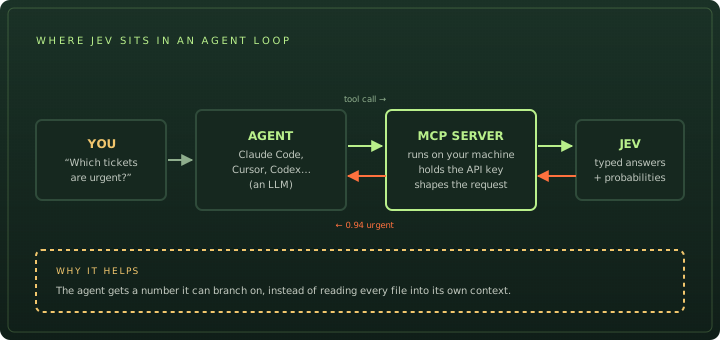
A Jev MCP server offers tools such as “ask Jev these questions about this text”. When the agent calls it, the server builds a Jev API request, sends it with your key, and hands back the typed answers.
Why give an agent Jev?
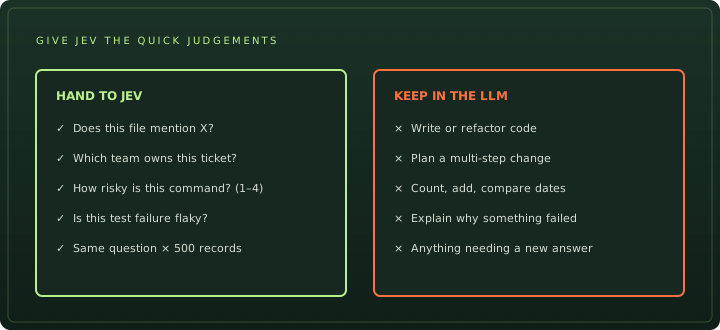
A coding agent is powered by a large language model. It is good at planning and writing, but every judgement it makes costs tokens from its context window and time. Some questions don’t need that:
The payoff is biggest when the same question repeats. JevMCP’s author describes the case well: to answer “which of these 300 files mention X?”, an agent normally reads all 300 files. With Jev it gets a short table of answers and confidence scores, and only opens the files Jev was unsure about.
Two limits to keep in mind. Jev answers each question independently, so it cannot chain reasoning; and TypeSafe’s own documentation lists maths, counting, and date comparison as weak spots. Keep those in the agent or in code.
The Jev MCP servers compared
We looked at every Jev MCP server we could find on GitHub. Three are ready to use:
| Server | Install | Keys | Best for |
|---|---|---|---|
| System One Connector MIT · Go binary | One-line install script; evaluate setup mcp registers Claude Code, Claude Desktop, Codex and Hermes | TypeSafe or OpenRouter; can point at a local Laya or CLM server | Most users. Batches up to 500 records per call and teaches the agent to write good questions. |
| JevMCP MIT · Python · v0.1.0 | Clone, create a virtualenv, run jev-mcp install | TypeSafe or OpenRouter | Asking the same questions about many files by glob pattern; lists unsure answers for the agent to check. |
| jev-mcp MIT · Node.js | Runs with npx, no install step | TypeSafe | Quick tools with fixed shapes: classify, score, check, and a risk gate for shell commands. |
Generate your setup
Pick your agent, a server, and where your key comes from. The generator writes the install command and the exact config for that client. It never asks for your key; paste it where the snippet says your-key-here.
Tool · Jev MCP config generator
Connect a Jev MCP server to your agent
Install the server
curl -fsSL https://raw.githubusercontent.com/itsmostafa/system-one-connector/main/install.sh | shRegister it with Claude Code
claude mcp add evaluate --scope user -e TYPESAFE_API_KEY=your-key-here -- /Users/you/.local/bin/evaluate mcpRestart Claude Code, then ask: “Use Jev to decide whether this message is urgent: My payouts have failed for three days.”
Community project, not affiliated with TypeSafe. Read the README before installing.
If you use the System One Connector, you can skip the config entirely and let it register itself:
curl -fsSL https://raw.githubusercontent.com/itsmostafa/system-one-connector/main/install.sh | sh
TYPESAFE_API_KEY=your-key-here evaluate setup mcp
Restart your agent afterwards. In Claude Code, /mcp lists the connected servers and their tools.
Prompts to try first
Name the tool in your first prompts so the agent learns when to use it:
- “Use Jev to check which files in
src/call the payments API directly. Only open the ones Jev is unsure about.” - “Use Jev to label each of these 200 support tickets as billing, technical, or account, then summarise the counts.”
- “Before running this migration, ask Jev how risky it is on a scale from safe to destructive.”
Then look at what came back. Every answer has a probability; decide in advance what you treat as confident. TypeSafe’s confidence guide and our threshold section explain how.
Keys, data and safety
- Keys stay in the server. MCP clients pass environment variables to the server process. The key is never part of a prompt, so the agent can’t leak it into a chat or a commit. Don’t commit config files that contain it.
- Jev only reads what it is sent. Your agent or the server decides which text goes to Jev. JevMCP, for example, reads the files matched by your pattern. Keep secrets and customer data out of those paths.
- Jev can’t act. It returns numbers and labels. Any command still runs through your agent and its permission prompts. A “low risk” score is a hint, not an approval.
- Data retention. TypeSafe says it does not train on customer requests; zero data retention on the direct API is for enterprise customers. Through Vercel AI Gateway you can require it per request.
MCP server or agent skill?
TypeSafe publishes an official agent skill. It solves a different problem: it teaches your coding agent how to write application code that uses Jev, with the right question types and patterns. An MCP server lets the agent use Jev while it works.
If you are building a product with Jev inside it, install the skill. If you want your agent to make faster, cheaper judgements during everyday coding, add an MCP server. Many people use both:
claude plugin marketplace add typesafe-ai/skills
claude plugin install typesafe@typesafe-ai
New to Jev? Start with how to use Jev, or check what the calls will cost on the Jev pricing page.
Frequently asked questions
Is there an official Jev MCP server?
Not as of 26 September 2026. TypeSafe publishes an agent skill that teaches coding agents to write Jev code, but the MCP servers that let an agent call Jev directly are community projects. The most widely used is the MIT-licensed System One Connector (itsmostafa/typesafe-mcp).
Can Jev replace the model behind Claude Code or Cursor?
No. Jev does not write text or code, so it cannot run an agent. It works as a tool the agent calls for quick judgements, while the agent's own LLM keeps doing the planning and writing.
Which API key does a Jev MCP server need?
Most need a TypeSafe API key from console.typesafe.ai. The System One Connector and JevMCP also accept an OpenRouter key. The key goes in the MCP server's environment, never in a prompt.
How much does a Jev MCP server cost to run?
The servers are free and open source. You pay for Jev calls at $0.042 per million input tokens. A typical question about a short file uses a few hundred tokens, so thousands of questions cost cents.
Can a Jev MCP server work offline?
Not with Jev itself, which is a hosted API. The System One Connector can point at a self-hosted server that speaks the same API, such as Laya, which runs on your own machine.
Sources
- GitHub itsmostafa/typesafe-mcp (System One Connector) ↗
- GitHub NicolasRisso/JevMCP ↗
- GitHub codaaiteam/jev-mcp ↗
- TypeSafe docs Jev with coding agents ↗
- TypeSafe docs Agent skill ↗
- Model Context Protocol Introduction to MCP ↗
Install commands and behaviour come from each project’s README, checked on 26 September 2026. These are community projects; they are not made or endorsed by TypeSafe AI, and this site is not affiliated with either.