
This guide shows how to use Jev from the very first question to a decision you can rely on in production. You’ll try it in the browser, learn to write questions Jev answers well, read its probabilities correctly, and then call it from code or from your coding agent. No machine-learning background needed.
Jev in one minute
Jev is a model from TypeSafe AI that answers defined questions. You don’t chat with it. You hand it some text or data and ask things like “is this a refund request?”, “which team should handle it?”, or “how urgent is it, on this scale?”. Jev answers each one with a type your code can use directly:
- Yes/no: the probability that a statement is true, from 0 to 1. TypeSafe calls this type
noul; the AI SDK calls itboolean. - Choice: one option from a list you define, with a probability for every option.
- Score: a position on a scale you describe, such as low / medium / high.
Because nothing is generated, answers come back fast (TypeSafe reports 70–500 ms) and cheap ($0.042 per million input tokens). For the full background, read what Jev does.
Three ways to use Jev
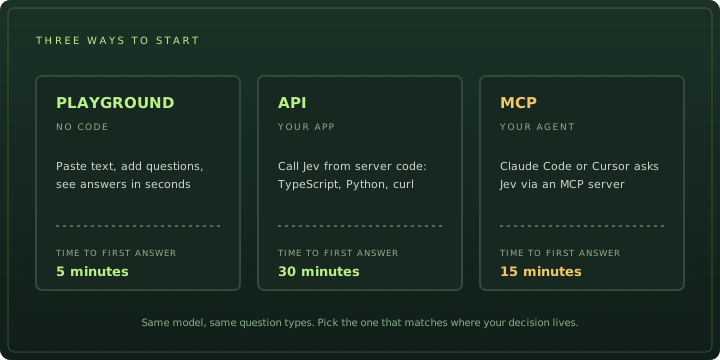
Whichever you pick, the request has the same two parts and the answers have the same shape, so nothing you learn in the browser is wasted.
Step 1: Try it in the browser
Open the Playground. Paste a real message you deal with, such as a support email, and add one question. Press Run Jev. You get 10 free credits without an account and 100 a month when signed in.
Not sure what to ask? Each of our tools is a working example you can open and change: message triage asks three questions about one message, and task routing shows how app rules act on the answer.
Step 2: Decide what Jev reads
The state is everything Jev can see. It can be a string, a JSON object, or an array. Use an object when your input has parts, so each part has a name:
{
  "message": "I was charged twice for order A-104. Please refund the duplicate.",
  "customer_tier": "gold",
  "charges_on_order": 2
}
Three rules make a big difference:
- Include the deciding facts. Jev can only judge what is in the state. An independent test found that when the deciding rule was missing, Jev still answered with an average confidence of 0.74 and was right only 44.7% of the time.
- Leave out the noise. Signatures, quoted email threads, and unrelated fields cost tokens and, according to TypeSafe, lower accuracy.
- Do maths and dates in code. Jev is weak at counting, arithmetic, and comparing dates. Send
charges_on_order: 2oroverdue: true, not a list of timestamps.
Step 3: Write good questions
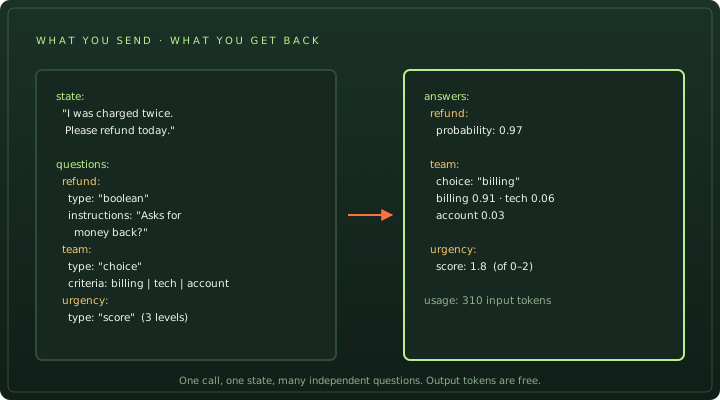
Pick the type from the shape of the answer you need:
| You need | Use | Criteria |
|---|---|---|
| A yes or no, or a filter | Yes/no (boolean / noul) | Optional: what counts as true and what counts as false |
| One label from a known list | Choice | Each option’s name and a short description (2–255 options) |
| A level on a scale | Score | An ordered list of levels, lowest first (2–10 levels) |
Then write it the way TypeSafe’s own guidance recommends: Jev “answers the question you wrote, not the one you meant”. A few rewrites that help:
| Vague | Better |
|---|---|
| Is this a priority? | Split it: Is the customer blocked from using the product? + Does the message mention losing money? Combine the answers in code. |
| Is it not unrelated to billing? | Is the message about a charge, invoice, or refund? No double negatives. |
| Choice: bug / feature / other | Add descriptions: bug: “something that used to work is broken”, feature: “asks for something new”, other: “anything else, including thanks”. |
| True means “no problem found” | Keep true = yes. Contradictions between the instruction and the criteria confuse the model. |
Ask related questions in the same call. They are answered in parallel and can’t see each other, which is faster and cheaper, but it also means question B can’t depend on question A. If it must, make two calls with your own logic in between.
Step 4: Read the answers
Keep the probability, not just the label. Two answers that are both “yes” can mean very different things:
- Yes/no 0.97 is a confident yes; 0.05 is a confident no, not “unsure”. Uncertainty sits near 0.5.
- Choice
billing 0.44 / technical 0.41means the two are close, even thoughbillingwon. - Score 1.5 on a 0–2 scale means Jev is split between the middle and top level. It is not a half-step.
Choice and score answers also include a confidence value between 0 and 1, which TypeSafe derives from how concentrated the probabilities are. It’s useful for spotting close calls. One independent test found it was no better than the top probability for deciding when to trust an answer, so start with the probability and test both.
Step 5: Turn answers into actions
Jev gives you a signal. Your code decides what to do with it, usually with two thresholds per question: act automatically when the answer is clearly one way, and send the middle to a person.
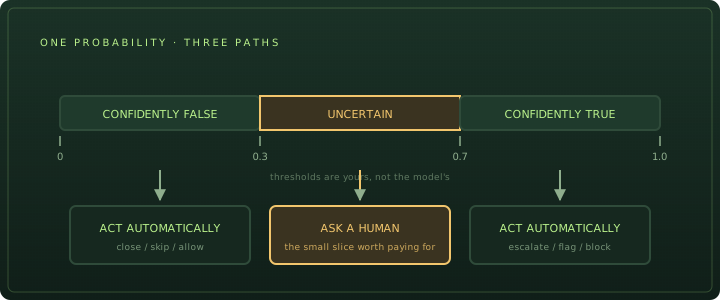
const REFUND = { auto: 0.9, review: 0.4 }; // tune on your own labelled examples

export function nextStep(probability: number) {
  if (probability >= REFUND.auto) return "start_refund_flow";
  if (probability >= REFUND.review) return "human_review";
  return "normal_queue";
}
Set thresholds per question, not once for the whole app. Independent tests found yes/no answers tend to be under-confident while choice and score answers tend to be over-confident, so the same 0.9 means different things for each.
Step 6: Call Jev from code or an agent
Once your questions work in the browser, move them into code. With TypeScript and the AI SDK:
import { experimental_evaluate as evaluate } from 'ai';

const result = await evaluate({
  model: 'typesafe-ai/jev',
  state: { message },
  questions: {
    refund: { type: 'boolean', instructions: 'Is the customer asking for money back?' },
    team: {
      type: 'choice',
      instructions: 'Which team should handle this message?',
      criteria: { billing: 'Payments and refunds', technical: 'Bugs and errors', account: 'Login and profile' },
    },
  },
});

console.log(result.answers.refund.probability, result.answers.team.choice);
Or with TypeSafe’s Python SDK (pip install typesafe-sdk):
from typesafe_sdk import Choice, Noul, TypeSafeClient

with TypeSafeClient() as client:  # reads TYPESAFE_API_KEY
    response = client.system_one(
        state={"message": message},
        questions={
            "refund": Noul(instructions="Is the customer asking for money back?"),
            "team": Choice(
                instructions="Which team should handle this message?",
                criteria={"billing": None, "technical": None, "account": None},
            ),
        },
    )
print(response.nouls["refund"].noul, response.choices["team"].choice)
The Jev AI API guide covers keys, all four ways to connect, errors, and a request builder that writes this code for your own questions. To let a coding agent such as Claude Code ask Jev questions while it works, follow the Jev MCP guide.
Step 7: Test before you trust it
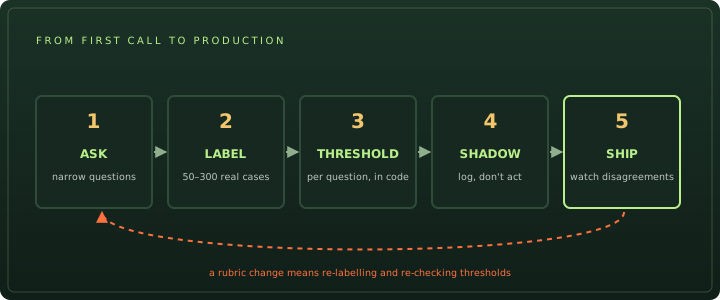
- Label real examples. Collect 50–300 inputs from your own traffic and write down the right answer for each.
- Measure. Run Jev on them and check accuracy at different thresholds. Look at the mistakes: most are fixed by rewording a question or adding a fact to the state.
- Shadow-run. Log Jev’s answers next to your current process without acting on them. Disagreements show you where the rubric is unclear.
- Version the bundle. Treat the model version, questions, and thresholds as one unit. The alias
jev-latestmoves when TypeSafe ships a new model, so pin a version such asjev-1.13.0in production and re-test before upgrading.
When to use Jev, and when not to
Good fits: routing messages or tasks, tagging and filtering records, scoring against a rubric, guardrails that check content before an action, and agent decisions such as “is this step done?”.
Poor fits: anything that needs written output (summaries, replies, code), multi-step reasoning, arithmetic and dates, or facts that aren’t in the state. Use a text-generating model, plain code, or both.
Before you commit, check what your volume will cost on the Jev pricing page and how Jev scored on public datasets in our Jev benchmark.
Frequently asked questions
Do I need to know machine learning to use Jev?
No. You write questions in plain English and get back a label, a score, or a probability. The only statistics you need is choosing a threshold, such as acting automatically when the probability is above 0.9, and testing that threshold on real examples.
Can I use Jev without writing code?
Yes. This site's Playground and tools run Jev in your browser with free credits, and TypeSafe has its own playground at console.typesafe.ai. You only need code when you want Jev inside your own app.
What languages does Jev support?
Jev reads text in many languages, but TypeSafe says English is its primary training language and accuracy is best there. Test on your own content before relying on other languages.
How many questions can I ask in one Jev call?
Many. Every question is answered independently against the same state in one pass, and the whole request must fit in 64,000 tokens. Asking related questions together is faster and cheaper than separate calls.
Why did Jev answer confidently when the answer wasn't in the text?
Jev has no way to say 'I don't know'. It always picks from the options you give it. If the deciding fact is missing from the state, add it, or add an explicit option such as 'not enough information'.
Sources
- TypeSafe docs Quick start ↗
- TypeSafe docs State ↗
- TypeSafe docs Primitives: Choice, Score and Noul ↗
- TypeSafe docs Jev 1.13 jaggedness (known weak spots) ↗
- TypeSafe docs Confidence ↗
- Vercel docs Evaluation with AI Gateway ↗
- GitHub Independent calibration test of Jev (scienthoon) ↗
Behaviour and limits are taken from TypeSafe’s documentation (checked 26 September 2026) and from independent tests credited in the text. This site is not affiliated with TypeSafe AI.