
On 29 September 2026, at DevDay, OpenAI announced the Decisions API: you give it a question, a fixed list of allowed answers and some context, and it gives you back one of those answers in about 150 milliseconds. That is very close to what Jev has done since mid-September. A lot of the commentary so far mixes up what OpenAI actually said with what people expect. This post keeps the two apart, shows where the products really differ, and explains how to build so that you can switch later.
The short answer
If you need to classify or route text today, at low cost, and you want probabilities you can set thresholds on, Jev is the one you can actually build with right now. If your decisions depend on images (screenshots, product photos, scanned forms), or you already run everything through OpenAI, join the Decisions API preview and test it. Either way, wait for real documentation before you compare accuracy or price.
What OpenAI actually announced
OpenAI’s official wording is short. The developer forum summary says the Decisions API “uses Luna to classify inputs, route requests, or choose an action from predefined answers.” Here is what is confirmed, what has only been reported, and what is still missing:
| Status | What we know |
|---|---|
| Confirmed by OpenAI | Built on GPT-6 Luna. You define questions and a finite list of answers. Context can be text or images. For classification, routing and an agent’s next step. Limited preview, with a wider release “in the coming days”. |
| Reported, not documented | About 150 ms per decision versus about 1.6 s for a regular Luna call (from launch-day demos and press coverage). A score or confidence value returned with the answer. |
| Not published | Price. Endpoint and request/response format. Maximum number of answers. Context size. Whether one call can ask several questions. Whether scores are calibrated. Rate limits, regions, data retention. Accuracy benchmarks. |
How each one works
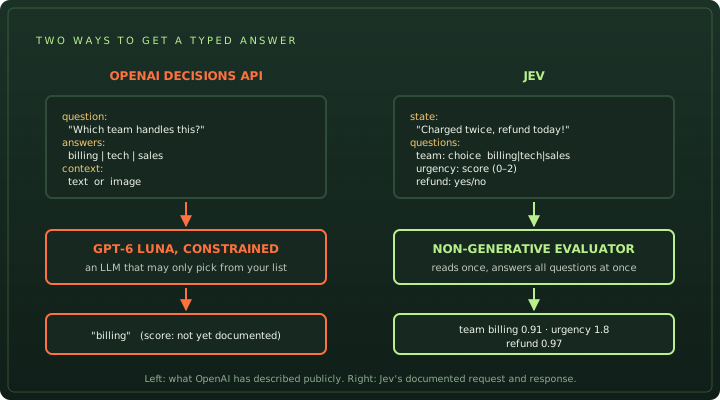
A normal chat model writes its answer word by word. If you want it to classify something, you ask for JSON, check the JSON, and retry when it’s wrong. That is slow and fiddly. Both products remove that step, but in different ways.
The OpenAI Decisions API takes GPT-6 Luna, a general model, and allows it to answer only with one of your listed options. It still has everything Luna knows, including how to read images. The catch: limiting a model to your labels stops it from writing nonsense, but it doesn’t stop it from choosing the wrong label with confidence.
Jev is a different kind of model. It never writes text at all. It reads your input once and scores every question against it at the same time, then returns a full spread of probabilities, for example billing 0.44 · technical 0.41. That spread tells you when the model is torn between two answers, which is the signal you need to send a case to a person. What is Jev? explains this in more detail.
Side by side
| OpenAI Decisions API | Jev | |
|---|---|---|
| Made by | OpenAI | TypeSafe AI |
| Underlying model | Specialised GPT-6 Luna (an LLM, constrained) | Jev (non-generative, built for this) |
| Status | Limited preview, by invitation | Available via TypeSafe, Vercel AI Gateway, OpenRouter, Cloudflare |
| Input | Text or images | Text only, up to 32,000 tokens of state |
| Question types | Pick one answer from a list | Choice (up to 255 options), score, yes/no |
| Questions per call | Not documented | Many, answered together |
| What comes back | One answer; score format not documented | Answer plus a probability for every option |
| Price | Not published (Luna: $0.10 in / $0.50 out per 1M tokens) | $0.042 per 1M input tokens, output free |
| Speed claim | ~150 ms (demo figure) | 70–500 ms at the model (TypeSafe) |
| Public docs | None yet | API reference, SDKs, AI SDK support |
Speed: comparing like with like
“150 ms” makes a great headline, but be careful about what it measures. It comes from launch demos, not a published p50 or p95, and it probably doesn’t include your network. TypeSafe’s 70–500 ms figure for Jev is measured at the model too. In our own benchmark, Jev took about 1.7 seconds per call end to end, because the time included the trip over the internet, the Vercel gateway, and the rate limits on our account. The number your users feel is always the end-to-end one.
The useful comparison is against what you would otherwise do. If your current setup asks a chat model for JSON and takes 1–3 seconds, both products are a big step forward. If you’re choosing between the two, measure both from your own servers, on the same inputs, and compare the slowest 5% of calls as well as the average.
Cost: the maths you can do today
Without an official price we can’t give you a true comparison, but we can show you which way it is likely to go. The chart below assumes the Decisions API is billed like a regular GPT-6 Luna call, which OpenAI has not confirmed.
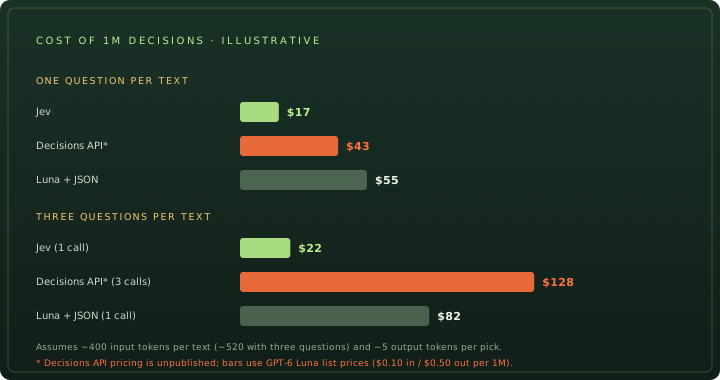
Two things drive the result:
- Input price. Jev charges $0.042 per million input tokens; Luna charges $0.10. Even with a few output tokens, Luna-style billing comes out roughly 2.5× higher for one question.
- Questions per call. This is the bigger lever. Real apps usually ask several things about the same message: which team, how urgent, is it a refund? Jev answers all of them in one call, so you pay for the text once. If the Decisions API needs one call per question, you pay for the text again each time. In the three-question example, that is the difference between about $22 and about $128 per million.
Two of these assumptions could change. OpenAI might price the Decisions API below Luna, and it might allow several questions per call. Treat the chart as a list of questions to ask once pricing is out, not as a verdict. Our Jev pricing calculator works out the Jev side for your own volumes.
Where OpenAI is ahead: images
This is the Decisions API’s clearest advantage. Jev reads text only, so any decision about a picture needs another model first to describe it. With the Decisions API, one call could handle things like:
- Does this product photo show the item described in the listing?
- Which screen is this app screenshot showing? (useful for computer-using agents)
- Is this uploaded document a receipt, an invoice or an ID?
Being part of OpenAI’s platform helps too: one bill, one set of keys, and the same data controls you already use for other OpenAI calls.
Where Jev is ahead today
- You can use it now. Public docs, published limits and four ways to call it. No waiting list.
- Richer answers. Scores (“how urgent, 0–3”) and yes/no probabilities, not just picks from a list. A score keeps the order of its levels, which a list of labels does not.
- A full probability spread. You can see when two options are close and send those cases for review. How good these probabilities are has been tested in public, including by us; see our benchmark and Jev vs Laya.
- Many questions, one bill. As the cost section shows, this matters more than the price per token.
- Not tied to one cloud. Jev runs through TypeSafe, Vercel, OpenRouter and Cloudflare, and an open-source model (Laya) speaks the same request format.
Which one should you use?
- Choose Jev if your inputs are text, you ask several questions about each one, you want probabilities for thresholds, or you need to ship this month.
- Try the OpenAI Decisions API if your decisions depend on images, you want a single vendor for everything, or you already have preview access and a labelled test set to try it on.
- Use both if you have mixed traffic: text messages go to Jev, and screenshots or photos go to the Decisions API, behind the same function in your code.
Whatever you choose, the model shouldn’t make the final call on anything expensive or hard to undo. Let it give a signal, and let your own code decide what to do with it.
Build so you can switch
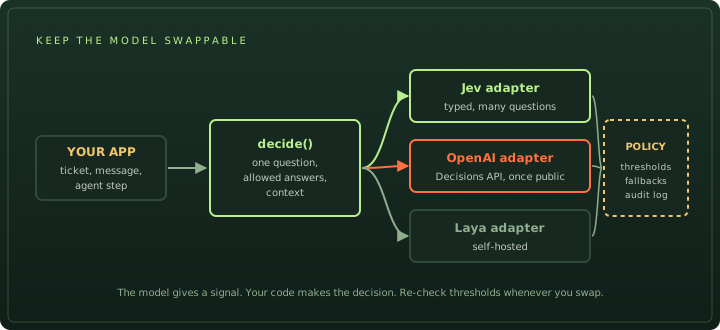
This kind of model is only a few weeks old, and prices and formats will keep changing. Put the model call behind one small function, so changing provider is a one-file change. Here is the idea in TypeScript, with a working Jev adapter:
import { experimental_evaluate as evaluate } from 'ai';

// What your app asks, no matter which model answers.
export type DecisionRequest<A extends string> = {
  question: string;
  answers: Record<A, string>; // answer -> what it means
  context: string;
};

export type Decision<A extends string> = {
  answer: A;
  confidence: number | null; // null if the provider gives no score
  provider: string;
};

export type Decider = <A extends string>(req: DecisionRequest<A>) => Promise<Decision<A>>;

// Jev adapter: works today.
export const jevDecider: Decider = async (req) => {
  const result = await evaluate({
    model: 'typesafe-ai/jev',
    state: req.context,
    questions: {
      pick: { type: 'choice', instructions: req.question, criteria: req.answers },
    },
  });
  const pick = result.answers.pick;
  return { answer: pick.choice, confidence: pick.probabilities[pick.choice] ?? null, provider: 'jev' };
};

// OpenAI adapter: write it once the request format is published.
// export const openaiDecider: Decider = async (req) => { ... };
The decision itself then lives in your code, where you can test it:
import type { Decider } from './decide';

export async function routeTicket(text: string, decide: Decider) {
  const d = await decide({
    question: 'Which team should handle this ticket?',
    answers: {
      billing: 'Charges, invoices, refunds and plan prices',
      technical: 'Bugs, errors, outages and broken integrations',
      account: 'Login, passwords, team members and permissions',
    },
    context: text,
  });

  // Thresholds belong to you, and are tuned per provider.
  if (d.confidence === null || d.confidence < 0.8) return { action: 'review', reason: 'low confidence' };
  return { action: 'assign', team: d.answer };
}
Two things to watch. First, a confidence of 0.8 from one model does not mean the same as 0.8 from another, so tune thresholds separately for each provider. Second, if a provider returns no score, send everything to review until you have checked its accuracy. The Jev AI API guide has the full Jev request format and a testing pattern that doesn’t call the model.
A test plan for when you get access
When the Decisions API opens up, a fair comparison takes an afternoon:
- Collect 200–300 real examples from your own traffic and label them by hand. Public datasets won’t tell you how either model does on your data.
- Use the same wording for the question and answers on both models.
- Measure four things: accuracy, how often a high-confidence answer is wrong, end-to-end latency (average and slowest 5%), and cost per 1,000 decisions from your real token counts.
- Check the hard cases. Look at the inputs where the two models disagree. That’s where your review queue will be.
- Run it in shadow mode first. Log the new model’s answers next to your current setup for a week before letting it act.
That’s the method we used in our Jev vs Laya test, and we plan to run the same test on the OpenAI Decisions API once the preview opens up. Meanwhile, you can see Jev’s answers on real examples in message triage and the other interactive tools, no code needed.
Frequently asked questions
What is the OpenAI Decisions API?
An API OpenAI announced at DevDay on 29 September 2026. You define a question and a finite list of allowed answers, send text or an image as context, and it returns one of the allowed answers. It runs on a specialised version of GPT-6 Luna and is in limited preview.
Is the OpenAI Decisions API the same as Jev?
No. Both return a choice instead of prose, but the OpenAI Decisions API constrains a general GPT-6 Luna model to pick from your answers, while Jev is a separate non-generative model from TypeSafe AI that answers several typed questions (choice, score, yes/no) about one text in a single call, with probabilities.
How much does the OpenAI Decisions API cost?
OpenAI had not published Decisions API pricing as of 2 October 2026. GPT-6 Luna itself lists $0.10 per million input tokens and $0.50 per million output tokens; it is not confirmed that the Decisions API uses the same rates. Jev lists $0.042 per million input tokens with free output.
Does the OpenAI Decisions API return probabilities?
OpenAI's own announcement does not say. Some coverage mentions a confidence score, but the response format and whether any score is calibrated are not yet documented. Jev returns a probability for every option of every question.
Is OpenRouter's Decisions endpoint the OpenAI Decisions API?
No. OpenRouter's /api/alpha/decisions endpoint serves Jev (typesafe/jev-1.13). The name is a coincidence; it is not OpenAI's product.
Sources
- OpenAI DevDay 2026 recap ↗
- OpenAI Developer Community DevDay 2026 announcements and developer resources ↗
- Neowin OpenAI unveils $500 ChatGPT Pro plan, Decisions API, and major Codex upgrades at DevDay 2026 ↗
- ModelSystem.One OpenAI Decisions API: what is and isn't published ↗
- ModelSystem.One OpenAI announces a Decisions API on GPT-6 Luna, in limited preview ↗
- OrcaRouter OpenAI's Decisions API: GPT-6 Luna picks one answer ↗
- DEV Community OpenAI DevDay 2026: every announcement, with prices and availability ↗
- TypeSafe docs Models: Jev limits and pricing ↗
- TypeSafe docs Confidence ↗
- OpenRouter Jev tutorial: Decisions endpoint ↗
Facts about the OpenAI Decisions API are as published by 2 October 2026, three days after the announcement. OpenAI has said a wider release is coming soon, so details may change quickly; we will update this post when documentation appears. Cost figures are illustrative scenarios, not quotes. Jev figures come from TypeSafe’s docs and our own benchmark. This site is not affiliated with OpenAI or TypeSafe AI.