
This Jev AI API guide takes you from an empty project to a working call. It covers the four ways to reach the API, the exact request and response shapes, limits and errors, and a step-by-step TypeScript walkthrough. The request builder below writes TypeScript, curl, or Python for your own questions.
Four ways to reach the Jev AI API
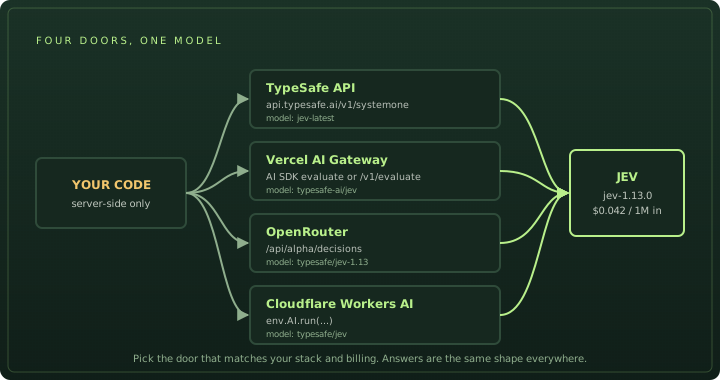
| Route | Endpoint | Model id | Key | Yes/no type |
|---|---|---|---|---|
| TypeSafe API | POST api.typesafe.ai/v1/systemone | jev-latest or jev-1.13.0 | TypeSafe key | noul |
| Vercel AI Gateway | AI SDK experimental_evaluate, or POST ai-gateway.vercel.sh/v1/evaluate | typesafe-ai/jev | Vercel OIDC token or gateway key | boolean |
| OpenRouter | POST openrouter.ai/api/alpha/decisions | typesafe/jev-1.13 | OpenRouter key | noul |
| Cloudflare Workers AI | env.AI.run('typesafe/jev', …) | typesafe/jev | Worker binding | noul |
The step-by-step walkthrough below uses the AI SDK through Vercel AI Gateway, because it gives you typed answers in TypeScript with no extra client. If you use another language or route, jump to calling the API without TypeScript.
Before you start
You need:
- Node.js 22 or later and a package manager. The examples use pnpm, but npm, yarn, and bun work too.
- A Vercel account and the Vercel CLI:
npm i -g vercel. - A Next.js project that uses the App Router. The examples use route handlers, but the
evaluatecall works in any server-side TypeScript code.
Call Jev from server code only, such as a route handler, a server action, or a script. Code that runs in the browser would expose your credentials.
Jev at a glance
| Model ID | typesafe-ai/jev |
|---|---|
| How to call it | experimental_evaluate from ai, version 7.0.105 or later |
| Question types | choice, score, boolean |
| Input size | Up to 32,000 tokens of state (64,000 per request in total) |
| Price | $0.042 per 1M input tokens, with no charge for output tokens |
| Privacy | Zero Data Retention and No Training can be required per request |
| Not supported | Text generation, streaming, and OpenAI-compatible endpoints |
Step 1: Install AI SDK
Jev needs AI SDK 7.0.105 or later, which added experimental_evaluate.
pnpm add ai
# or: npm install ai
The experimental_ prefix means the API can change, even in a patch release. Pin the exact version in package.json and read the release notes before you upgrade.
Step 2: Connect to AI Gateway
If you pass a plain model ID such as 'typesafe-ai/jev', AI SDK sends the call through Vercel AI Gateway. You don’t need a TypeSafe account or key, but the Gateway needs to know who is calling:
| Where your code runs | How it signs in | What you do |
|---|---|---|
| A Vercel deployment | OIDC token | Nothing. Vercel adds the token automatically. |
| Your computer | Short-lived OIDC token | Run vercel link, then vercel env pull. |
| Another host, a script, or CI | API key | Create a key in the AI Gateway dashboard and set AI_GATEWAY_API_KEY. |
vercel link      # connect this folder to a Vercel project
vercel env pull # writes VERCEL_OIDC_TOKEN to .env.localStep 3: Ask your first question
Start with one yes-or-no question. The function below asks whether a customer message is a cancellation request:
import { experimental_evaluate as evaluate } from 'ai';

export async function wantsToCancel(message: string) {
  const result = await evaluate({
    model: 'typesafe-ai/jev',
    state: message,
    questions: {
      cancel: {
        type: 'boolean',
        instructions: 'Does the customer want to cancel their subscription?',
        criteria: {
          true: 'The customer asks to cancel, close, or stop renewing their plan.',
          false: 'The customer asks a question, complains, or wants a different plan.',
        },
      },
    },
  });

  return result.answers.cancel.probability; // a number from 0 to 1
}
We sent “Hi, please cancel my subscription before the next billing date. Thanks.” and got this back:
{ "cancel": { "type": "boolean", "probability": 0.99 } }Three things to notice:
stateis what Jev looks at. It can be a string, a JSON object, or a JSON array. There is no system prompt.- Each key in
questionsbecomes a key inanswers. Here,cancelgoes in andcancelcomes out, fully typed. criteriais optional for booleans, but worth writing. It tells Jev exactly what counts as true and false. Step 5 shows how much this can change an answer.
A boolean probability is the chance that the statement is true. Near 1 means a strong yes. Near 0 means a strong no, not “unsure.” Values near 0.5 mean the model can’t tell.
Step 4: Pick the right question type
Every question has a type, an instructions string, and usually criteria. The type decides the shape of the answer:
| Type | Use it when | criteria | You get back |
|---|---|---|---|
choice | You need one option from a list: a queue, a category, a tool | An object of option keys and descriptions, with up to 255 options | choice and probabilities for every option |
score | You need a level on an ordered scale: urgency, quality, risk | An array of 2 to 10 level descriptions, from lowest to highest | score and probabilities for every level |
boolean | You need to know if a statement is true | Optional true and false descriptions | probability that the statement is true |
A few details that are easy to miss:
choiceis typed as your option keys. With optionsbillingandtechnical, TypeScript sees'billing' | 'technical', so a typo likechoice === 'tech'fails at compile time. The selected option always has the highest probability.- Add an
otheroption. Jev must pick one of your options. Without a catch-all, a message that fits nothing still lands in a real queue. - A
scorestarts at 0 and can be a decimal. It is the probability-weighted average of the levels, so2.69means “between level 2 and level 3, closer to 3.” Theprobabilitieskeys are strings:"0","1", and so on. - A score is not a probability. Dividing
3.2by the top level4gives0.8, but that does not mean an 80% chance of anything. It is still a position on your scale.
Describe options instead of naming them
Jev matches the state against your descriptions, so a bare label gives it very little to work with:
| Weak | Better |
|---|---|
high: 'high' | blocking: 'The customer cannot do their work and has no workaround' |
billing: 'billing' | billing: 'Charges, invoices, refunds, and plan prices' |
Descriptions can also be JSON objects or arrays. For example, you can give each option a list of example phrases.
Step 5: Ask several questions in one request
Jev answers every question in a request separately, in parallel, and against the same state. That has two effects:
- Extra questions are cheap. Adding a question barely changes latency, and it does not change the answers to other questions.
- Questions cannot see each other. If question B depends on the answer to A, make two calls with your own code in between.
The function below reads a support ticket and asks three questions at once. The model parameter has a default, so you can swap in a fake model for tests in Step 7.
import {
  experimental_evaluate as evaluate,
  type Experimental_EvaluationModel as EvaluationModel,
} from 'ai';

export type Ticket = {
  subject: string;
  message: string;
  plan: string;
};

export async function askJev(
  ticket: Ticket,
  model: EvaluationModel = 'typesafe-ai/jev',
) {
  return evaluate({
    model,
    state: ticket, // objects work; no need to JSON.stringify
    questions: {
      team: {
        type: 'choice',
        instructions: 'Which team should handle this ticket?',
        criteria: {
          billing: 'Charges, invoices, refunds, and plan prices',
          technical: 'Bugs, errors, outages, and broken integrations',
          account: 'Login, passwords, team members, and permissions',
          other: 'Anything that does not fit the teams above',
        },
      },
      urgency: {
        type: 'score',
        instructions: 'How badly is this blocking the customer?',
        criteria: [
          'Not blocking: a question or a small visual issue',
          'Annoying, but there is a workaround',
          'Blocking: the customer cannot do their work',
          'Blocking and causing lost money or lost data',
        ],
      },
      wantsRefund: {
        type: 'boolean',
        instructions: 'Is the customer asking for money back?',
      },
    },
    providerOptions: {
      gateway: { zeroDataRetention: true }, // optional
    },
  });
}
Add a route handler so you can call it over HTTP:
import { askJev, type Ticket } from '@/lib/triage';

export async function POST(request: Request) {
  const ticket = (await request.json()) as Ticket;
  const result = await askJev(ticket);
  return Response.json(result.answers);
}
Start the dev server with pnpm dev, then send a ticket:
curl -X POST http://localhost:3000/api/triage \
  -H "Content-Type: application/json" \
  -d '{
    "subject": "CSV export broken for 3 days",
    "message": "Every CSV export fails with error 500. Our finance team cannot close the month. If this is not fixed today I want this month refunded.",
    "plan": "pro"
  }'
This is a real response from our test run:
{
  "team": {
    "type": "choice",
    "choice": "technical",
    "probabilities": { "billing": 0, "technical": 1, "account": 0, "other": 0 }
  },
  "urgency": {
    "type": "score",
    "score": 2.69,
    "probabilities": { "0": 0, "1": 0, "2": 0.31, "3": 0.69 }
  },
  "wantsRefund": { "type": "boolean", "probability": 0.95 }
}
team and urgency look right. wantsRefund needs a closer look. The customer did not ask for a refund. They said they would want one if the bug is not fixed today. Our question was vague, so Jev read it broadly.
We added criteria to the same question and ran it again:
wantsRefund: {
  type: 'boolean',
  instructions: 'Is the customer asking for money back?',
  criteria: {
    true: 'The customer asks for money back right now, with no conditions.',
    false: 'No refund request, or the refund is only a threat that depends on something else happening first.',
  },
},
The probability dropped from 0.95 to 0.24. Neither answer is wrong. They answer different questions. When a result surprises you, check the wording of your question before you blame the model.
Step 6: Turn answers into decisions
Jev gives you signals. Your code makes the decision. Keep thresholds in your code, not in the question. That way you can tune them without changing what you ask, and without calling the model again.
For choice and score answers, there are two useful numbers:
- The selected option’s probability,
team.probabilities[team.choice]. How likely is this answer? - TypeSafe’s confidence,
result.providerMetadata.typesafe.confidence, keyed by question ID. It measures how focused the whole distribution is, from0(spread evenly) to1(all on one option). It is not returned for booleans, and other providers do not have it.
Add a triageTicket function to lib/triage.ts. It assigns clear tickets and sends everything else to a person:
export async function triageTicket(
  ticket: Ticket,
  model: EvaluationModel = 'typesafe-ai/jev',
) {
  const result = await askJev(ticket, model);
  const { team, urgency, wantsRefund } = result.answers;

  // How likely is the chosen team? (undefined = unknown, never 0)
  const teamProbability = team.probabilities?.[team.choice];

  // How focused is the whole distribution? (TypeSafe only)
  const confidence = result.providerMetadata?.typesafe?.confidence as
    | Record<string, number>
    | undefined;
  const teamConfidence = confidence?.team;

  if (teamProbability == null || teamConfidence == null) {
    return { action: 'review' as const, reason: 'missing probability data' };
  }
  if (teamProbability < 0.7 || teamConfidence < 0.6) {
    return { action: 'review' as const, reason: 'team is unclear' };
  }

  return {
    action: 'assign' as const,
    team: team.choice, // 'billing' | 'technical' | 'account' | 'other'
    urgency: urgency.score, // 0 to 3, can be a decimal
    refund: readBoolean(wantsRefund.probability),
  };
}

// Booleans get three bands. The middle band means "not sure".
function readBoolean(probability: number) {
  if (probability >= 0.8) return 'yes' as const;
  if (probability <= 0.2) return 'no' as const;
  return 'unsure' as const;
}
Then change the route handler to return the decision instead of the raw answers:
import { triageTicket, type Ticket } from '@/lib/triage';

export async function POST(request: Request) {
  const ticket = (await request.json()) as Ticket;
  return Response.json(await triageTicket(ticket));
}
Why the code is written this way:
- A missing value is not zero. AI SDK marks choice and score
probabilitiesas optional, because some providers do not return them. If you replace a missing value with0or1, you invent a prediction. Send those cases to review. - Booleans need a middle band. If you only check
≥ 0.8, a confident “no” (0.03) and a coin flip (0.5) end up in the same branch. - Classifying is not approving.
refund: 'yes'means the customer asked. Whether they get the money depends on your refund policy and their account, and Jev sees neither. Check those in a separate step.
Choose thresholds for your own data
The 0.7, 0.6, and 0.8 above are starting points. Set stricter thresholds when a wrong action costs more:
| What the answer triggers | Example | Starting point |
|---|---|---|
| Something easy to undo | Show a hint, pick an internal queue | About 0.7 |
| Something a customer sees | Send an automatic reply | Higher, plus spot checks |
| Something hard to undo | Delete data, issue money, run a command | 0.9 or more, and a confirmation step below it |
To find your own numbers:
- Collect a few hundred real examples and have people label the right answer themselves, without seeing Jev’s suggestion. Include hard and ambiguous cases.
- Run them through the exact same questions.
- Group the results by probability (0.7–0.8, 0.8–0.9, and so on) and count how often each group was right.
- Compare cutoffs. A higher cutoff makes fewer automatic mistakes but sends more work to people. Pick the balance your team can handle.
Check each question on its own. Independent tests found that Jev’s probabilities can be too confident for some question types and not confident enough for others. What Jev does and when to use it covers those results.
Step 7: Test your logic without calling Jev
Your thresholds are normal code, so test them like normal code. AI SDK includes a fake evaluation model in ai/test. It returns whatever answers you give it, with no network call and no cost.
pnpm add -D vitestimport { Experimental_EvaluationMockModelV4 as MockEvaluationModel } from 'ai/test';
import { describe, expect, it } from 'vitest';
import { triageTicket, type Ticket } from './triage';
type Answers = Awaited<ReturnType<MockEvaluationModel['doEvaluate']>>['answers'];
const ticket: Ticket = {
subject: 'CSV export fails',
message: 'Every export has failed since Monday.',
plan: 'pro',
};
// A fake Jev that always returns the answers you give it.
function fakeJev(answers: Answers, confidence?: Record<string, number>) {
return new MockEvaluationModel({
doEvaluate: async () => ({
answers,
warnings: [],
...(confidence && { providerMetadata: { typesafe: { confidence } } }),
}),
});
}
const clearAnswers: Answers = {
team: {
type: 'choice',
choice: 'technical',
probabilities: { billing: 0.04, technical: 0.94, account: 0.02, other: 0 },
},
urgency: {
type: 'score',
score: 1.9,
probabilities: { 0: 0, 1: 0.2, 2: 0.7, 3: 0.1 },
},
wantsRefund: { type: 'boolean', probability: 0.05 },
};
describe('triageTicket', () => {
it('assigns the ticket when the team is clear', async () => {
const decision = await triageTicket(ticket, fakeJev(clearAnswers, { team: 0.9 }));
expect(decision).toEqual({
action: 'assign',
team: 'technical',
urgency: 1.9,
refund: 'no',
});
});
it('sends the ticket to review when two teams are close', async () => {
const decision = await triageTicket(
ticket,
fakeJev(
{
...clearAnswers,
team: {
type: 'choice',
choice: 'billing',
probabilities: { billing: 0.48, technical: 0.45, account: 0.07, other: 0 },
},
},
{ team: 0.7 },
),
);
expect(decision.action).toBe('review');
});
it('sends the ticket to review when confidence is missing', async () => {
const decision = await triageTicket(ticket, fakeJev(clearAnswers));
expect(decision.action).toBe('review');
});
});pnpm vitest run lib/triage.test.ts
✓ lib/triage.test.ts (3 tests)
Test Files 1 passed (1)
Tests 3 passed (3)Get ready for production
Set a timeout and give every failure a destination
A call either returns an answer for every question or throws an error. There is no partial result. Decide in advance what happens when a call fails. In most apps, the safe default is “send it to a person.”
// In askJev, next to model and state:
//   abortSignal: AbortSignal.timeout(5_000), // give up after 5 seconds
//   maxRetries: 1,                           // default is 2

export async function safeTriage(ticket: Ticket) {
  try {
    return await triageTicket(ticket);
  } catch (error) {
    console.error('Jev evaluation failed', error);
    return { action: 'review' as const, reason: 'evaluation failed' };
  }
}
Retries use extra time. In a user-facing request, one quick retry followed by a fallback is usually better than a long wait.
Errors you may see
| Error | What it usually means | Fix |
|---|---|---|
401 / 403 | Your token expired, the folder is not linked, or the project has no Gateway access | Run vercel link and vercel env pull, or check your API key |
NoSuchModelError | The model ID is wrong, or the provider cannot evaluate | Use typesafe-ai/jev and call through AI Gateway |
Experimental_EvaluationUnsupportedQuestionTypeError | The model does not support a question type. The whole call fails. | Use only choice, score, and boolean |
InvalidArgumentError | Your input is invalid, such as a score with one level or a value that is not JSON | Check your state and criteria |
InvalidResponseDataError | The provider returned an invalid answer, such as a missing option | Retry. If it keeps happening, report the request to the provider. |
Log enough to learn from later
Save the answers, result.response.modelId, result.usage, and a version name for your questions and thresholds. When you edit a description or change a cutoff, run your labeled examples again. A small change in wording can shift the probabilities, as Step 5 showed.
Probabilities are rounded to two decimal places, and result.rounding tells you the precision. A distribution may add up to 0.99. That is expected, so don’t renormalize it.
Limits you should know
| Request size | 64,000 tokens per request in total; 32,000 for the state plus the longest single question |
|---|---|
| Choice options | 2 to 255 per question (this site’s Playground allows 10 to keep the editor manageable) |
| Score levels | 2 to 10, ordered lowest first |
| Input | Text only: a string, a JSON object, or an array of text. No images, audio, or video. |
| Rate limits | 250,000 tokens per second and 1,200 requests per minute on the TypeSafe API, “adjusting dynamically” under heavy demand |
| Models | jev-1.13.0; aliases jev-latest and jev-preview point to it today. GET /v1/models lists what your key can use. |
| Output | Probabilities are rounded to 0.01 and are often exactly 0 or 1 |
Aliases move when TypeSafe ships a new model, and answers can shift with them. Pin a versioned id in production and log the model field each response reports.
The rate limits are real. When we ran our Jev benchmark with four parallel workers through Vercel AI Gateway, most calls failed with an upstream rate-limit error; one call at a time with a short pause worked reliably.
Handle errors
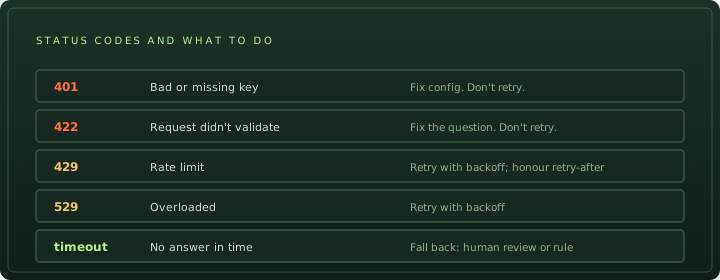
The native TypeSafe API returns 401 for a bad key, 422 when the request doesn’t validate, 429 when you hit a rate limit, and 529 when the service is overloaded. The official SDKs retry the last two with backoff and honour the retry-after header. Through the AI SDK, those surface as the errors in the production table above.
Estimate the cost
The Jev AI API charges for input tokens only, at $0.042 per 1M. Output is free, so cost depends on the size of your state, questions, and descriptions, not on the length of the answer.
| Call | Input tokens | Cost per call | Cost per 1M calls |
|---|---|---|---|
| Step 3: one boolean, short message | 335 | $0.000014 | about $14 |
| Step 5: three questions, one ticket | 517 | $0.000022 | about $22 |
Read the exact count from each response: result.usage.inputTokens in the AI SDK, usage.input_tokens on the native API, or usage.cost on OpenRouter. For your own volume, use the calculator on the Jev pricing page.
Call the Jev AI API without TypeScript
TypeSafe API with curl
The native endpoint takes the same three fields. Note the yes/no type is noul here:
curl -X POST https://api.typesafe.ai/v1/systemone \
  -H "Authorization: Bearer $TYPESAFE_API_KEY" \
  -H "Content-Type: application/json" \
  -d '{
    "model": "jev-latest",
    "state": "I was charged twice for my subscription. Please refund one.",
    "questions": {
      "refund": { "type": "noul", "instructions": "Is the customer asking for money back?" },
      "team": {
        "type": "choice",
        "instructions": "Which team should handle this?",
        "criteria": { "billing": "Payments and refunds", "technical": "Bugs and errors" }
      }
    }
  }'
The response names the model version that answered and reports usage (the numbers here are illustrative):
{
  "model": "jev-1.13.0",
  "answers": {
    "refund": { "type": "noul", "noul": 0.98 },
    "team": {
      "type": "choice",
      "choice": "billing",
      "confidence": 0.94,
      "probabilities": { "billing": 0.97, "technical": 0.03 }
    }
  },
  "usage": { "input_tokens": 312, "output_tokens": 24 }
}
Score answers look similar: a score between 0 and the top level, probabilities keyed by level index, a legend mapping each index to your level text, and confidence.
Python with the official SDK
pip install typesafe-sdk # or: uv add typesafe-sdkfrom typesafe_sdk import Choice, Noul, Score, TypeSafeClient
with TypeSafeClient() as client: # reads TYPESAFE_API_KEY
response = client.system_one(
state={"document": "I was charged twice. Please fix this ASAP."},
questions={
"billing": Noul(instructions="Is this ticket about billing?"),
"tone": Choice(instructions="What is the customer's tone?",
criteria={"calm": None, "frustrated": None, "angry": None}),
"urgency": Score(instructions="How urgent is this ticket?",
criteria=["can wait", "this week", "today"]),
},
)
print(response.nouls["billing"].noul)
print(response.choices["tone"].choice)
print(response.scores["urgency"].score)There is also an async client (AsyncTypeSafeClient) and a JavaScript SDK (npm install @typesafe-ai/sdk) with the same shape.
OpenRouter
OpenRouter serves the same request and response format on its Decisions endpoint, which is still under an /alpha/ path. Each response adds usage.cost in dollars:
curl https://openrouter.ai/api/alpha/decisions \
  -H "Authorization: Bearer $OPENROUTER_API_KEY" \
  -H "Content-Type: application/json" \
  -d '{ "model": "typesafe/jev-1.13", "state": "…", "questions": { … } }'
Vercel AI Gateway over HTTP
Without the AI SDK, post to https://ai-gateway.vercel.sh/v1/evaluate with model: "typesafe-ai/jev". This endpoint uses the AI SDK question names (boolean) and returns the cost in providerMetadata.gateway.cost. Add "providerOptions": { "gateway": { "zeroDataRetention": true } } to require zero data retention. Vercel also offers a TypeSafe-compatible API, so an existing TypeSafe client only needs a new base URL.
Build a request for your own questions
Write your state and questions below and copy working code for TypeScript, curl, or Python. It checks the limits above as you type and converts boolean to noul where the route needs it. Nothing is sent anywhere.
Tool · Jev AI API request builder
Build a Jev request and copy the code
TypeScript uses the AI SDK through Vercel AI Gateway (typesafe-ai/jev).
import { experimental_evaluate as evaluate } from 'ai';

const state = "Hi, I was charged twice for my March invoice and I can't log in to download the receipt. Please refund the duplicate today.";
const questions = {
  "wants_refund": {
    "type": "boolean",
    "instructions": "Is the customer asking for money back?",
    "criteria": {
      "true": "The customer asks for a refund, credit, or chargeback.",
      "false": "The customer asks a question or reports a problem without asking for money back."
    }
  },
  "team": {
    "type": "choice",
    "instructions": "Which team should handle this message?",
    "criteria": {
      "billing": "Payments, invoices, refunds",
      "technical": "Bugs, outages, errors",
      "account": "Login, profile, permissions"
    }
  },
  "urgency": {
    "type": "score",
    "instructions": "How urgent is this message?",
    "criteria": [
      "Can wait for a normal reply",
      "Should be handled today",
      "Blocking the customer right now"
    ]
  }
};

const result = await evaluate({
  model: 'typesafe-ai/jev',
  state,
  questions,
  maxRetries: 0,
  providerOptions: { gateway: { zeroDataRetention: true } },
});

console.log(result.answers);
Keys stay in environment variables; nothing you type here leaves your browser.
Common mistakes
| Mistake | Do this instead |
|---|---|
Calling Jev with generateText or an OpenAI-compatible client | Use experimental_evaluate or /v1/evaluate |
| Asking one big question, such as “Is this ticket a priority?” | Ask small questions (urgency, impact, customer tier) and combine them in code |
| Asking about a fact that is not in the state | Add the fact to the state. Jev cannot say “I don’t know,” so it will still answer. |
| Asking Jev to do math, count, or compare dates | Do it in code and pass the result, such as overLimit: true |
| Passing an array of 50 tickets to classify them all | An array is one state. Make one call per ticket. |
Reading a missing probabilities as 0 | Treat it as unknown and send the case to review |
Reading a boolean 0.05 as “unsure” | It is a confident no. Uncertainty is near 0.5. |
| Using one threshold for every question | Test each question and each action separately |
Letting a true answer approve an action | Classify with Jev, then check permissions and policy in code |
Frequently asked questions
What is the Jev AI API endpoint?
TypeSafe's own endpoint is POST https://api.typesafe.ai/v1/systemone with a Bearer API key. Jev is also available on Vercel AI Gateway (model typesafe-ai/jev), OpenRouter's Decisions endpoint (typesafe/jev-1.13), and Cloudflare Workers AI (typesafe/jev).
Is the Jev AI API compatible with the OpenAI API?
No. Jev returns typed answers instead of chat completions, so OpenAI-compatible clients and generateText cannot call it. Use the TypeSafe SDKs, the AI SDK's experimental_evaluate, or plain HTTP.
How do I get a Jev API key?
Create one at console.typesafe.ai/keys (TypeSafe was in early access in September 2026). Alternatively, use an OpenRouter key, or call Jev through Vercel AI Gateway with your Vercel project's OIDC token or a gateway API key.
What are the Jev AI API rate limits?
TypeSafe lists 250,000 tokens per second and 1,200 requests per minute, and says limits are adjusting dynamically during high demand. Over the limit you get HTTP 429; retry with exponential backoff.
Why is the yes/no question type called noul?
Noul is TypeSafe's name for a question that returns the probability a statement is true. The AI SDK and Vercel's HTTP API call the same type boolean and return it as probability instead of noul.
Sources
- TypeSafe docs API reference ↗
- TypeSafe docs Models: limits, aliases and rate limits ↗
- TypeSafe docs Python SDK ↗
- OpenRouter Jev tutorial: Decisions endpoint ↗
- Cloudflare Jev on Workers AI ↗
- Vercel How to classify, route, and score with Jev and AI SDK ↗
- AI SDK docs Evaluation ↗
- Vercel docs AI Gateway evaluation and HTTP API ↗
- Vercel Jev model page ↗
- TypeSafe docs Confidence ↗
Example responses, token counts, and the refund-criteria comparison come from live calls we made on 2026-09-24 with ai@7.0.107. Your numbers will differ. This site is not affiliated with TypeSafe AI or Vercel.